Reusing 2.5D Normal Maps: Procedural Weather and Environmental Effects for Pixel Art
Background
I recently came across SpriteCook's post How to add snow and ice to a 2D pixel art scene. It outlines a clever approach for procedurally adding snow and ice to a pixel-art scene at runtime without redrawing any assets.
SpriteCook's pipeline runs in three stages:
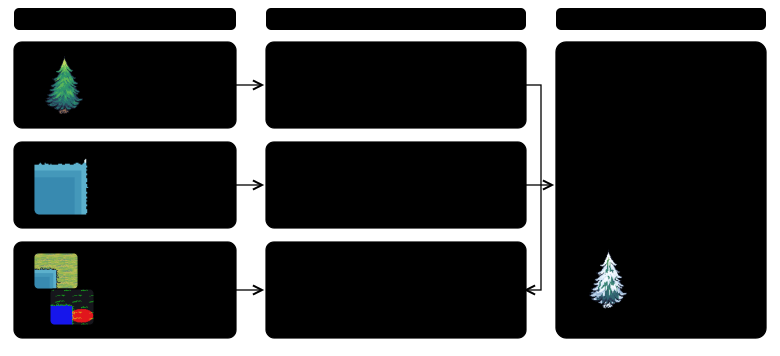
- Input: takes layered scene data — object sprites, water tiles, ground tiles, and an auxiliary mask for the ground layer.
- Offline baking: runs a dedicated coverage algorithm for objects, water, and ground, writing each pixel's coverage region, arrival stage, and shade index into a baked map. Like a normal map, it is a GPU-readable data texture that packs offline results directly into pixel channels.
- Real-time rendering: a shader reads the baked map, a preset palette, and the current progress value to produce the final frame. For instance, if a pixel stores
(R, G, B) = (3, 2, 0)in the baked map, once progress reaches stage 3 it gets replaced by color index 2 from the snow palette.
The key piece of the system is step 2, offline baking. Taking object snow coverage as an example, it computes each pixel's data in three steps:
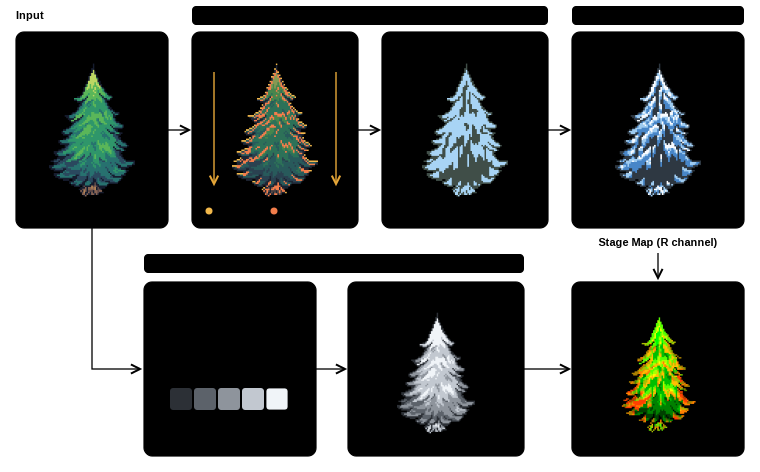
- Determine which pixels can hold snow (WHERE):
- Surface detection: scan top-to-bottom column by column. A transparent-to-opaque transition marks an outer top surface; a sharp dark-to-bright jump marks an interior local surface.
- Candidate filtering: extend downward from each detected surface up to a set thickness, filtering out the darkest luminance tier and dark outlines. What remains is the candidate snow zone.
- Determine when those pixels get snow (WHEN): sort candidate pixels by a weighted combination of depth from the surface, source luminance, and random noise, then split them into 3 snow stages. Pixels closer to the surface and brighter in the source image turn white first.
- Determine what shade of snow to draw (WHAT): normalize source pixel luminance and quantize it into five indices (0–4) for looking up the snow palette at render time.
Where SpriteCook falls short
In more complex scenes, this approach still runs into several limitations:
On visual quality:
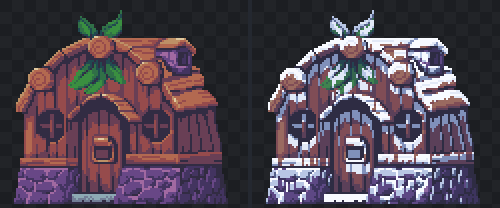
- Guessing surfaces from brightness jumps and fixed depth: without 3D orientation data, the algorithm treats any "dark above, suddenly bright below" jump as a new snow-catching surface, so walls and doors tucked under eaves easily pick up stray snow.
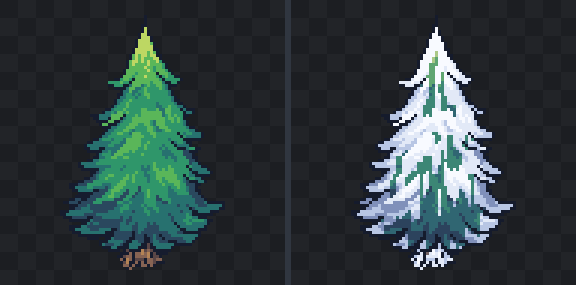
- Vertical streaks from column-wise scanning: scanning each column independently along the Y axis provides no horizontal constraint. On foliage or assets with mixed light and shadow, adjacent columns detect surfaces at very different heights, pulling out unnatural vertical strips.
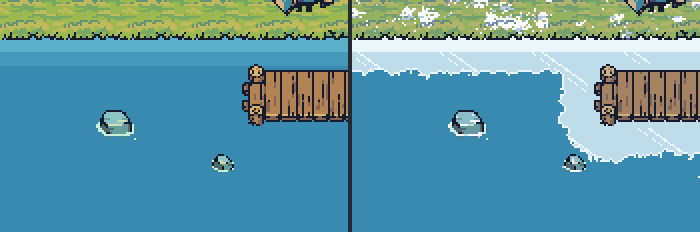
- No cross-layer occlusion or interaction: layers and sprites are baked independently, so objects cannot shield lower surfaces from snowfall, and water cannot sense rocks sitting inside it to form an ice edge around them. While the ground layer uses an extra mask to approximate canopy shade and roads, that mechanism does not extend across sprites and layers.
- In-place recoloring lacks volume: snow only swaps existing pixel colors without altering the silhouette, making it look like flat white paint.
- No wind direction: top-down vertical scanning means snow can only fall straight down, leaving no way to model windward vs. leeward buildup under angled wind.
- Discrete stage jumps: ground and objects only have four and three discrete stages respectively, making smooth, gradual accumulation hard to achieve.
On extensibility:
- Rules tightly coupled to snow: swapping palettes changes the overlay color, but the spatial distribution rules are still hardcoded around snow and ice. Effects with different spatial patterns — like moss climbing a wall or rain seeping into mortar seams — require designing a new algorithm from scratch.
Seeing these gaps immediately brought to mind @xprite/lighter from my previous post 3D Lighting on 2D Pixels. It already recovers per-pixel orientation, color-region facets, outlines, and de-lighting from a single pixel sprite. Building cross-layer occlusion, silhouette volume, and a continuous baking protocol on top of it seemed like a clean way to turn a snow script into a general 2.5D environmental pipeline.
A better snow scene
Architecturally I kept the "offline baking + real-time rendering" split, focusing all changes on the offline baker to address each limitation one by one.
Taking object snow coverage as an example (ground and water follow a similar flow, swapping surface slope for upper-layer occlusion and shoreline distance), the full pipeline looks like this:
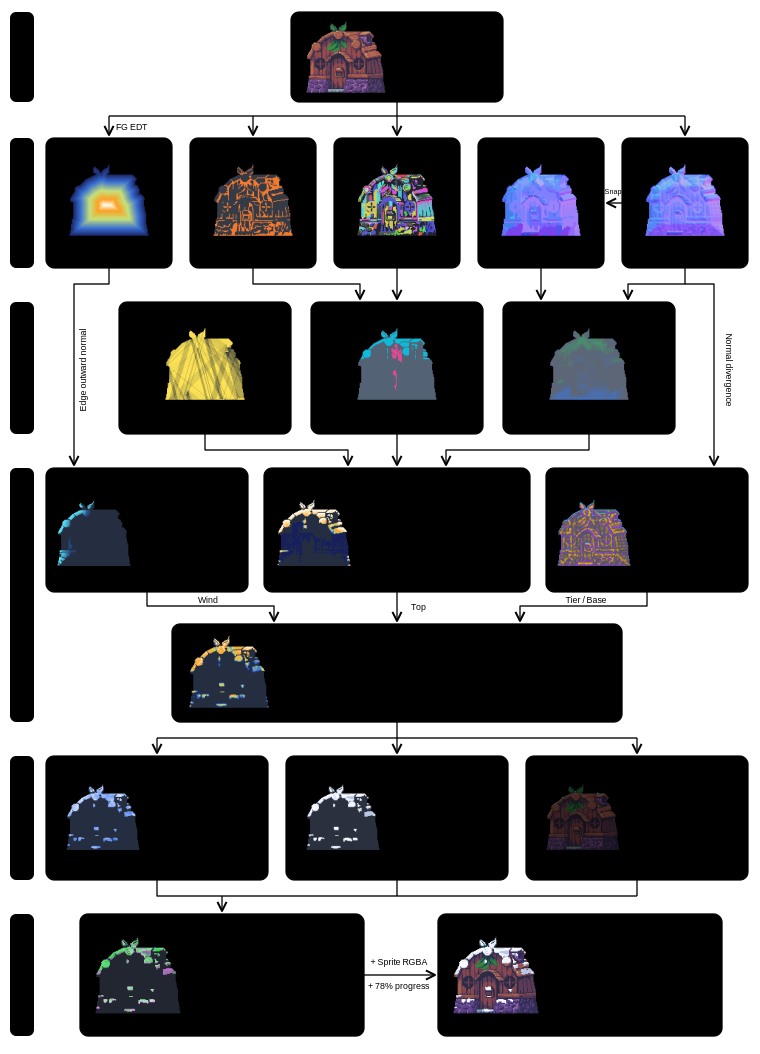
Base feature extraction
To stop guessing surfaces from brightness jumps and fixed depths, we first extract as much geometric information as possible from the flat sprite. Reusing @xprite/lighter, we already get:
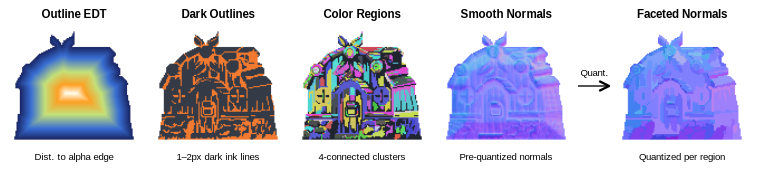
- Outline Euclidean distance (EDT): used to compute windward faces.
- Thin dark outlines: preserved so coverage does not erase fine boundary detail.
- Connected color regions: groups 4-connected pixels of similar color into regions, which serve as the unit for surface orientation and adjacency graphs.
- Smooth normals: preserve fine tilt variations between neighboring pixels, used for computing surface curvature and each region's average orientation.
- Faceted normals: aggregate and quantize smooth normals per color region so each region shares one orientation, keeping snow shading crisp and pixel-aligned rather than blurry gradients.
Recovering occlusion and surface structure
Once the base features are extracted, the next step is reconstructing as much 3D structure as possible — namely occlusion and surface orientation — to decide where snow can and cannot land.
First comes occlusion that can be read directly from alpha silhouettes and layers. This is computed via sky visibility: combining the foreground mask, upper layers, and wind direction, parallel rays are cast along the main wind vector and several symmetric oblique angles to check whether each pixel can see the sky:
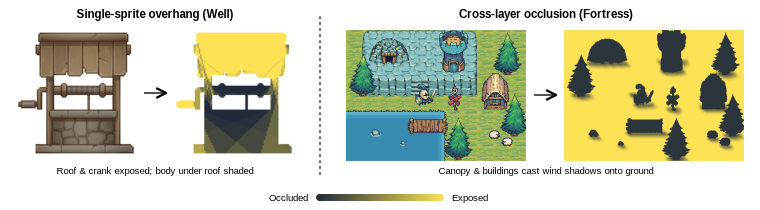
However, plenty of occlusion in pixel art is hidden inside solid silhouettes — the cabin sprite above has no internal transparent pixels and lives on a single layer, so silhouette rays cannot catch it. For those cases, we need to infer interior surface structure directly:
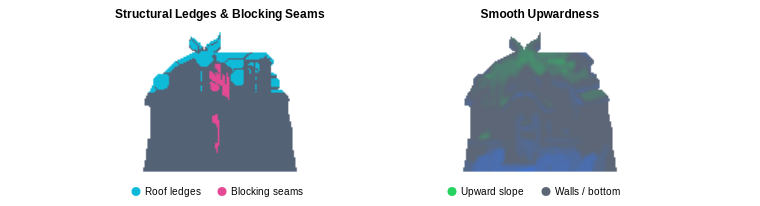
- Structural ledges and blocking seams (hard boundaries): build a region adjacency graph from color regions, outlines, normal directions, and color jumps. Protruding eaves and flat tops are marked as ledges that can independently catch snow, while dark under-eave seams and window recesses are marked as blocking seams that stop snow from bleeding through.
- Smooth upwardness (continuous slope): domes and tree canopies curve smoothly without sharp creases; here we take the Y component of the faceted normals and apply edge-aware denoising to measure how strongly each pixel faces the sky.
2D propagation and potential synthesis
With occlusion and structure in place, we can lay down the snow.
As noted earlier, SpriteCook scans each column independently (1D), so adjacent columns have no awareness of one another and brightness jumps pull out vertical streaks.
Now that every pixel has a known slope and boundary, propagation can move onto the 2D pixel grid: snow spreads left, right, and diagonally downward across upward-facing slopes, stopping at blocking seams or occluded zones. Moving to 2D also brings in lateral context, letting snow respond to angled wind rather than only falling straight down.
Much like breaking forces into components in high-school physics, each factor affecting snow buildup is propagated separately and then combined:
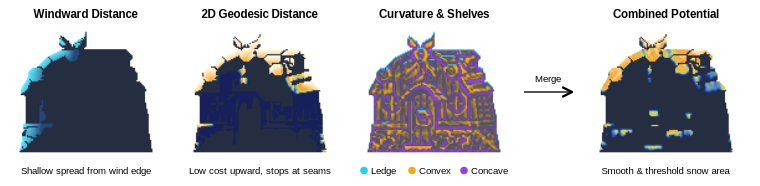
- Windward distance (wind potential): take the gradient of the outline EDT to get outward edge normals and determine which outer side a pixel faces.
- On the windward side, propagate a short distance inward along the wind vector, with higher potential closer to the exposed edge.
- On the leeward side, set potential directly to 0.
- 2D geodesic distance (top potential): propagate across the 2D grid from exposed top edges and roof ledges, weighted by surface slope.
- Gentle upward slopes decay slowly so snow spreads farther; crossing onto vertical walls spikes the decay cost so it stops within one or two pixels.
- Downward undersides, blocking seams, and occluded areas drop immediately to 0.
- Curvature and interior shelves (tier potential): take the divergence of the smooth normals to locate convex ridges, then combine with horizontal outlines to mark interior ledges so multi-tier canopies and stepped architecture can also accumulate snow.
Finally, the three potential fields are combined, denoised with edge-aware smoothing, and thresholded to produce the final snow-eligible pixels.
Three-channel baking
Once the snow area is decided, the last step is packing the result into a single baked texture matching the sprite's dimensions.
Looking back at SpriteCook's baked map, outside of the water layer most of the texture's capacity goes unused:
- The R channel only stores three or four discrete stages, leaving almost all of 0–255 unused.
- The B channel sits empty.
Putting that spare capacity to work solves both continuous transitions and silhouette volume without adding a second texture:
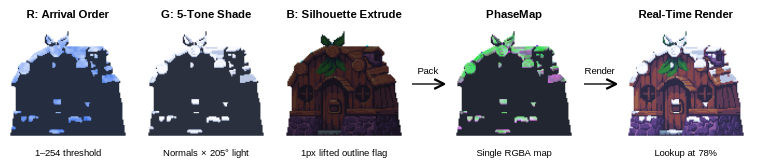
Filling the R channel: from discrete to continuous
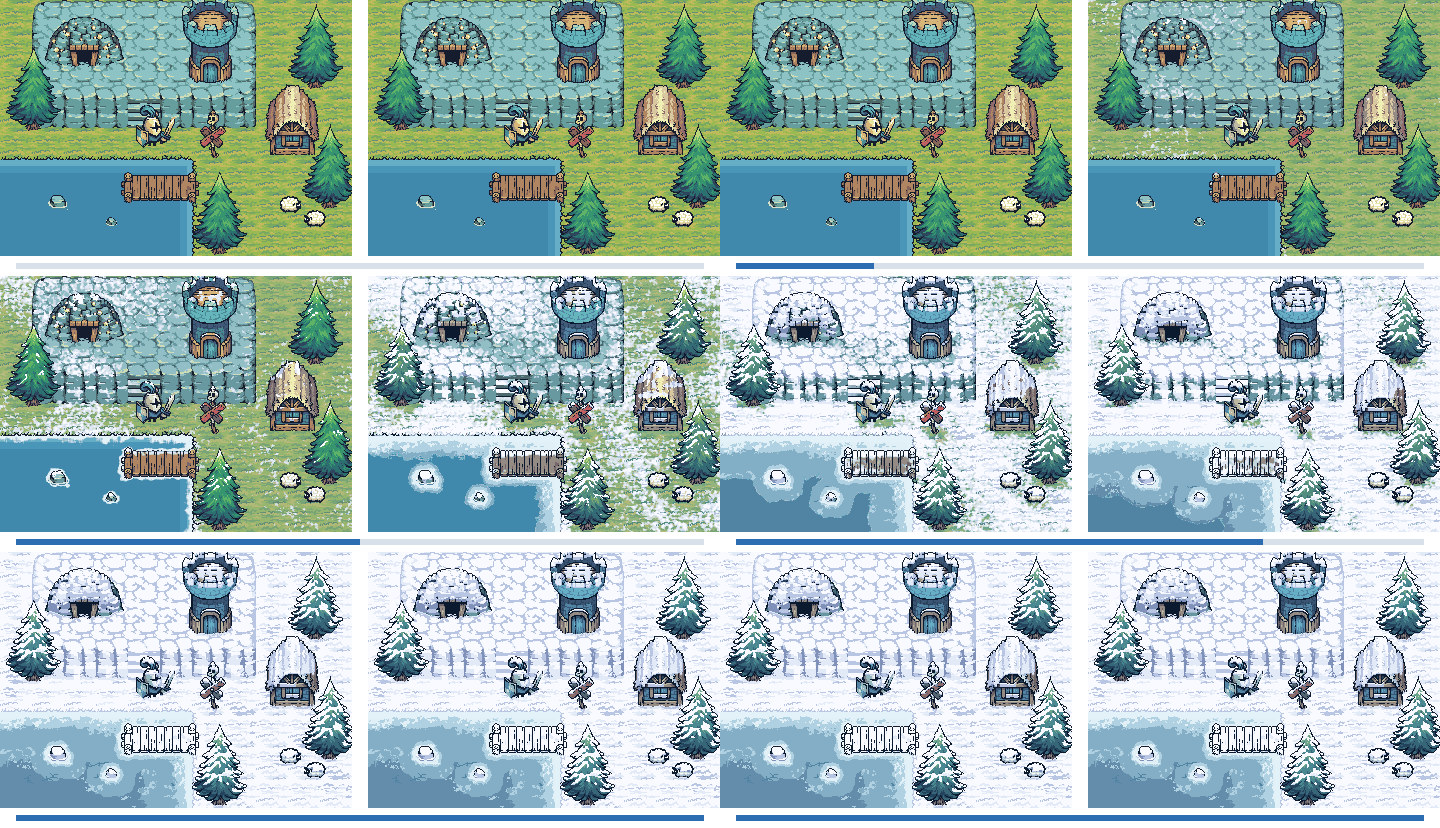
All eligible snow pixels are ranked by a mix of combined potential, relative height, wind alignment, and clustered noise, then mapped directly to continuous thresholds in 1–254. At playback time, comparing the current progress against R per pixel advances the snow line smoothly.
Using the B channel: growing past the silhouette
By encoding the transparent air pixels immediately bordering the sprite into the B channel, snow can actually extend beyond the original silhouette and gain thickness:
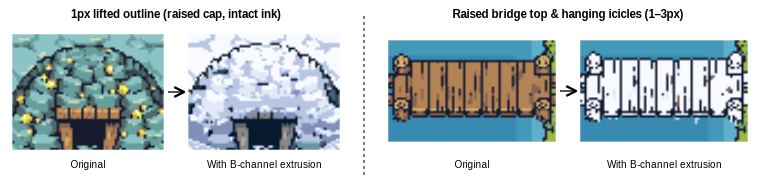
- Outlined sprites (1px lifted outline): once a top surface gets snow, the original 1px dark top outline is shifted 1px upward into transparent air, its previous spot is filled with bright snow, and 1px side edges are closed off. The snow cap physically rises above the silhouette while keeping the original line art intact.
- Unoutlined sprites (1px extruded cap): when there is no outer outline to lift, a 1px white snow cap is added directly above the top edge.
- Overhanging undersides (1–3px hanging icicles): along downward-facing edges that have snow above and transparent air below, random 1–3px icicles grow downward per pixel.
- Progress-linked growth: extruded pixels also receive R-channel thresholds, deliberately ordered slightly behind the snow pixels supporting them. Scrubbing the progress slider shows snow blanketing the roof first, then swelling upward by 1px and sprouting icicles beneath the eaves.
As for the remaining two channels:
- G channel: combines faceted normals, lighting direction, and vertical position within the snow cap to assign shades 1–4 (brighter along top ridges, a darker shadow rim along the underside).
- A channel: marks valid baked pixels, and doubles as ice crack data on water layers.
All four channels are packed into a single baked map. The real-time shader does zero geometry work — it checks R for visibility, looks up the palette with G, and draws lifted outlines and icicles from B.
Beyond snow: generalizing to more environments
As mentioned earlier, I wanted a pipeline that wasn't limited to winter scenes. Stepping back at this point, the 2.5D geometric features extracted in the first half have nothing specific to snow — they can be reused directly.
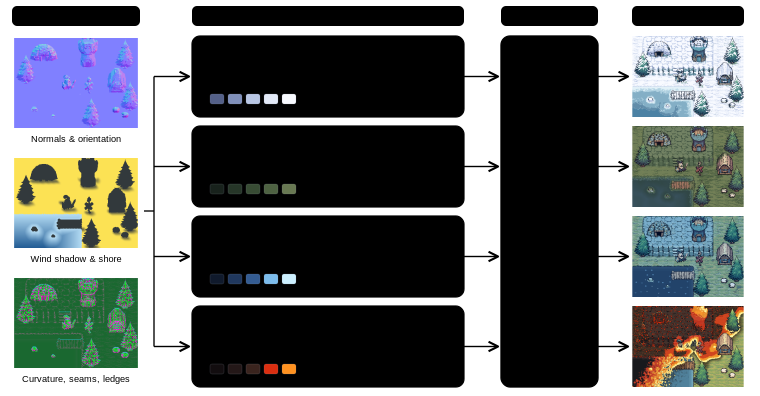
The idea is to split the pipeline into two layers: a shared 2.5D geometry base and swappable preset rules:
-
Compute geometry and occlusion once Outline distance, thin dark outlines, connected color regions, smooth and faceted normals, curvature, concave crevices, cross-layer wind occlusion, and water shoreline distance are all intrinsic properties of the scene. Whether the target effect is snow, rain, or fire, these base features are computed once and reused without rewriting extraction logic.
-
Replace hardcoded snow logic with geometric weights and spread rules The real difference between environmental effects comes down to which geometric features they favor and how they propagate. Abstracting placement into five general weights (normal orientation, curvature, crevices, outline distance, sky exposure), paired with propagation operators and extrusion toggles, covers a wide range of effects:
| Preset | Favored geometry | Spatial evolution & extrusion |
|---|---|---|
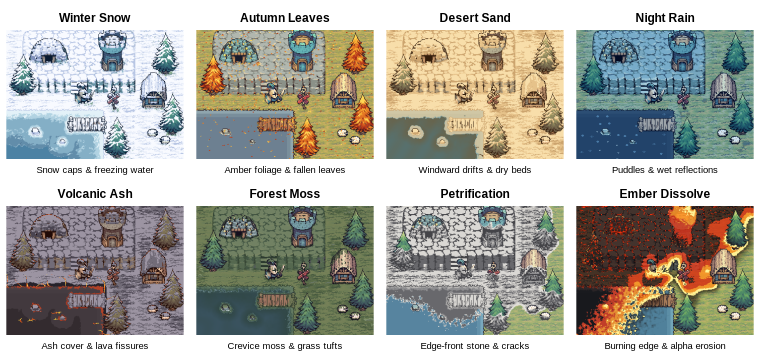
| Winter Snow | Upward, exposed top surfaces | 2D slope propagation, 1px lifted outline, hanging icicles, water freezing inward from shore |
| Autumn Leaves | Sunlit canopy outer edges & shaded ground | Foliage shifts yellow/red by hue and height; fallen leaves scatter on ground and water |
| Desert Sand | Windward slopes & exposed low ground | Wind-aligned sand ripples and windward drifts; water dries toward the center |
| Night Rain | Smooth ridges & low-lying ground | Reflective puddles on ground, Fresnel wet sheen on surfaces, dripping under eaves |
| Volcanic Ash | Exposed upward surfaces | Ash coats top surfaces; water turns into dark crust with glowing lava fissures |
| Forest Moss | Shaded, damp crevices | Climbs upward from stone seams, sprouting 1–2px pixel grass tufts and hanging vines |
| Petrification | Silhouette edges & base | Replaces top-down fall with an edge-advancing front and stone surface cracks |
| Ember Dissolve | Silhouette edges & high-curvature ridges | Advances along a burning front, eroding source pixels to transparent in the final stage |
- Unified baked-map protocol and a single shader
Regardless of which of the 8 presets is selected, offline baking always outputs the same RGBA
PhaseMap(R continuous threshold, G 5-tone palette index, B extrusion and crack flags, A valid mask). At runtime, swapping the palette, Oklab base tint shift, and particle type is enough — one shader handles all 8 presets without writing separate shaders per effect.
Closing
Wiring together 2.5D normals, cross-layer occlusion, and three-channel baking produces fairly natural environmental transitions on pixel-art scenes with just an offline bake and a lightweight shader. That said, the approach still has clear boundaries and trade-offs:
- Sensitive to input layering and feature quality: if normal estimation or color-region clustering misreads a sprite, snow or moss placement drifts along with it. On a flat, unlayered image, cross-layer occlusion and water interactions cannot be computed at all.
- Heavier offline baking cost: compared with simple column scanning, adding normal estimation, region adjacency graphs, raycast occlusion, and 2D propagation makes baking noticeably slower — well suited for offline pre-baking, not per-frame recomputation.
- Generalization trades away fine-grained detail: using one shared set of geometric features and parameters across many environments means you cannot write tailored heuristics for specific assets or materials (such as distinguishing leaves, stone walls, and timber). It gives a solid general-purpose baseline, but falls short of effects tuned specifically for a single scene.